
Concept Storyboard
A visual representation of your project’s concept through a storyboard offering a sequential depiction of the users journey and interaction with the emerging technology or design used.
The Problem
Before we move on to creating the storyboard it’s important to acknowledge what the problem is and how our solution helps.
The problem in this case being that kids no are more focused on short term gratification than learning, yet books have not adapted to this, so what needs to happen is… There needs to be a new way for kids to enjoy books without losing interest it has to be interactive, keep them engaged and most importantly fun. Without meeting those criteria the chances of someone buying a book like this instead of finding the information online through shorter form video content are slim. So in order to keep the game book genre alive they must evolve, this is where AR interactivity comes in, each interaction should leave the user wondering what the next one will look like leading them in to read on further without losing interest. It also helps that this is not a widely used concept and therefore it is very possible that it could be a kids first interaction with the technology. Based on this its clear to see any design introduced should be presented in an interesting way and not difficult to activate without prior knowledge.
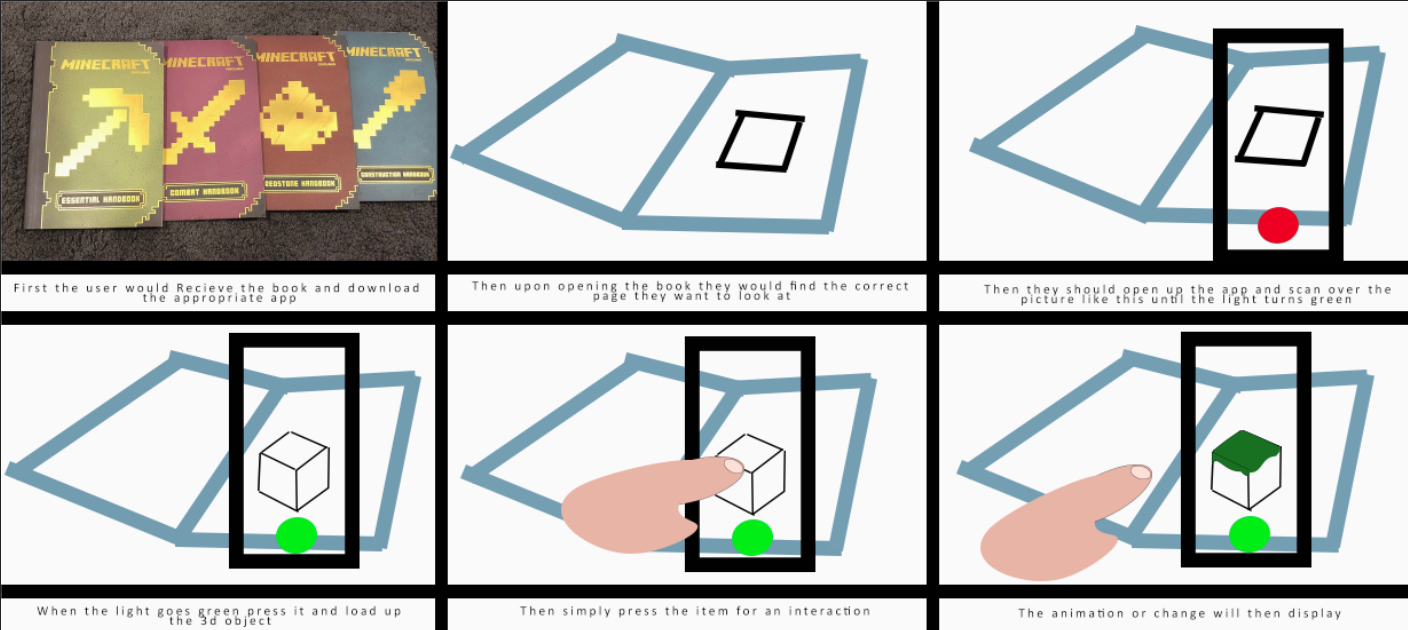
As you can see here the simplified version of the steps a user would have to take to use the AR tool in this way, it is however important to mention that since we wont be creating the app itself but more just using a programme like Zapworks to implement our idea the user will first have to scan a QR code which could be placed on the front of the book in order to avoid any unnecessary searching for it. This also makes it easier for the user themselves to quickly activate their phone to perceive the AR before opening the book itself. Being that the target audience for a book like this would be kids the Actual interaction itself should be fairly easy to accomplish for users of any age, meaning design should be simple yet also make it abundantly clear that objects can be tapped for a reaction rather than the alternative of having no interactions which often, with kids attention spans getting shorter (1. D’Aurizio, S. 2024) it’s important at this point to make things clear at a glance what you can and can’t do, therefore if possible in the software I will attempt to make it clear the object can be pressed for an interaction of some kind (if applicable).
References
- D’Aurizio, S. (2024) Are attention spans actually decreasing?, The Center for Brain, Mind and Society. Available at: https://brainmindsociety.org/posts/are-attention-spans-actually-decreasing (Accessed: 18 November 2024).